Features · A family tree, drawn
Make a family tree on your phone
A free family tree app for Android, built so the whole family can fill it in together.
Try it free on Google PlayAndroid now, iPhone coming. Updated 26 October 2026.
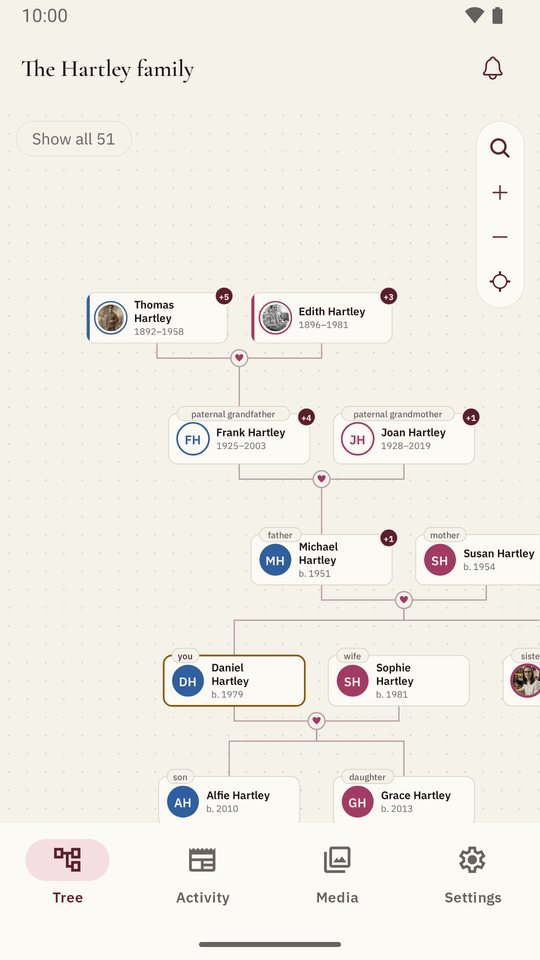
To make a family tree in Shijro, install it, add yourself, then add your parents and grandparents by name. The tree draws itself as you go. You can leave out dates, and you can invite relatives to fill in what you don’t know.
Why the tree starts with you
I didn’t want Shijro to open on an empty page and a form, which is where a lot of family trees end before they begin. So after you sign up it asks whether you’re starting your family’s tree or joining one a relative already started. Starting one is two short steps: you, then your parents and grandparents. Then you’re looking at your tree, with a photo, a memory, a question for a relative and inviting people offered as things to do next, not more steps in the way. Every step has a Later button.
A name is enough to add someone. A birthday can be a full date, a month and year, or just a year, because “she was born around 1931” is how most families actually know it.
How the tree is drawn
I wanted it to look like the tree you’d sketch on paper. Parents sit above their children. A couple is joined by a double line and sits closer together than brothers and sisters, so you can tell them apart. Brothers and sisters go from oldest to youngest.
Everyone gets a small card with their photo beside their full name and dates, low enough that four or five generations fit on a phone held upright. If there’s no photo yet, their initials sit in a circle of their own colour.
Your close family also carry a word saying what they are to you: father, grandmother, cousin, son-in-law, in your own language. I stopped at first cousins and in-laws, because past that the words get long and the person’s own page says it better. Tap anyone and the line from you to them lights up.
Zoom out and more relatives come into view, and zoom in to hide them again. In a big family, a cousin’s husband or wife shows as a small name on the cousin’s card, and tapping it brings them into the tree. Without that, a row of thirty cousins and their partners runs off any phone screen.
Adding people quickly
Tap anyone on the tree and their card shows four ways to grow it from them: a parent, a partner, a child or a brother or sister. Each opens the same short form, with two tabs at the top: a new person, or someone already in the family. If someone already has two parents, Parent is greyed out, so you can see at a glance what is missing.
Building it with your family
Nobody knows the whole family by themselves, so a Shijro tree is shared. You invite relatives with a link and decide who can edit and who can only look. Everyone sees the same tree as it grows.
To try it before adding your own family, the sign-in screen opens the Hartleys, a made-up family with four generations, photos and recordings.
Questions people ask
Is Shijro a free family tree app?
Yes. Building the tree, adding photos, stories and recordings, and inviting relatives are free, with no advertisements. Each family has room for 2,000 people.
Do I need to know dates to add someone?
No. A name is enough. Dates can be exact, a month and year, just a year, or left empty until somebody remembers.
Can I add relatives who have died?
Yes. Mark them as passed away, add the date if it is known, and their page can also say where they rest.
Can I look around before I sign up?
Yes. The sign-in screen has a link to the Hartleys, a made-up family, so you can try the tree, the stories and the photos first.