Features · Invite relatives
Invite relatives to your family tree
Share a link in the family chat and let each relative add what they know.
Try it free on Google PlayAndroid now, iPhone coming. Updated 26 October 2026.
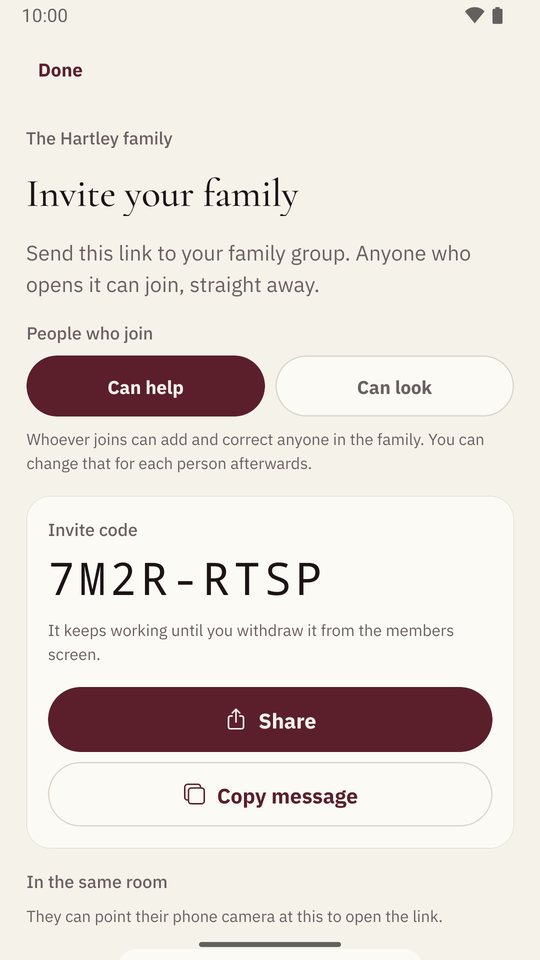
To invite relatives to your family tree in Shijro, open the family’s Members, choose Invite, and share the link to your family group chat. You can also show a QR code or read out a short code. When you make the link, you choose whether people who join can edit the tree or only look at it.
Why invitations are links
Relatives have each other’s phone numbers and family group chats. Far fewer of them know each other’s email addresses. So I built invitations around a link you share wherever your family already talks. Shijro doesn’t send anything itself. Share hands the message to WhatsApp, Messages or whatever else is on your phone.
Three ways to invite:
- A link, shared to any chat app.
- A QR code, for when you’re in the same room. They point their camera at your screen.
- A short code, for reading out over the phone.
A relative who installs Shijro from your link lands straight on the invitation, with nothing to type. An admin can also invite someone by email.
Choosing who can edit
Each link says what the people who join it can do. With Can help, they can add and correct anyone in the family. With Can look, they can read everything and browse the tree but can’t change anything. You can change this for each person later. A link never makes anyone an admin.
I built the family tree to be shared because no single person knows the whole family. Your mother knows her side, your uncle knows the cousins, and your grandmother knows names that were never written down. A tree only one person can edit stops where that person’s memory does.
Seeing what others add
A family’s Activity shows what was added recently: new photos at full size, the opening lines of a story, and recordings you can play right there. Shijro can also notify you when a relative asks you something, answers your question, or adds a photo of you or your close family. You choose which of these you want.
Who can see the family
Nobody, unless they’re invited. Your family can’t be found by searching, and nothing in it is public.
Questions people ask
Do relatives need an email invitation?
No. Share the link in any chat app, show the QR code, or read out the code. An admin can also invite someone by email.
Can I stop someone changing things?
Yes. Choose Can help or Can look when you make the link, and change it for each person afterwards from the family's members.
Is there a limit on how many relatives can join?
No. As many relatives as want to join can, for free.
What does a relative see when they open the link?
A page naming your family, with a button to install Shijro. Once installed, the app opens on the invitation, with no code to type.