Features · Tagged family photos
Tag everyone in your family photos
Add a photo once, tag who is in it, and it shows on each of their pages.
Try it free on Google PlayAndroid now, iPhone coming. Updated 26 October 2026.
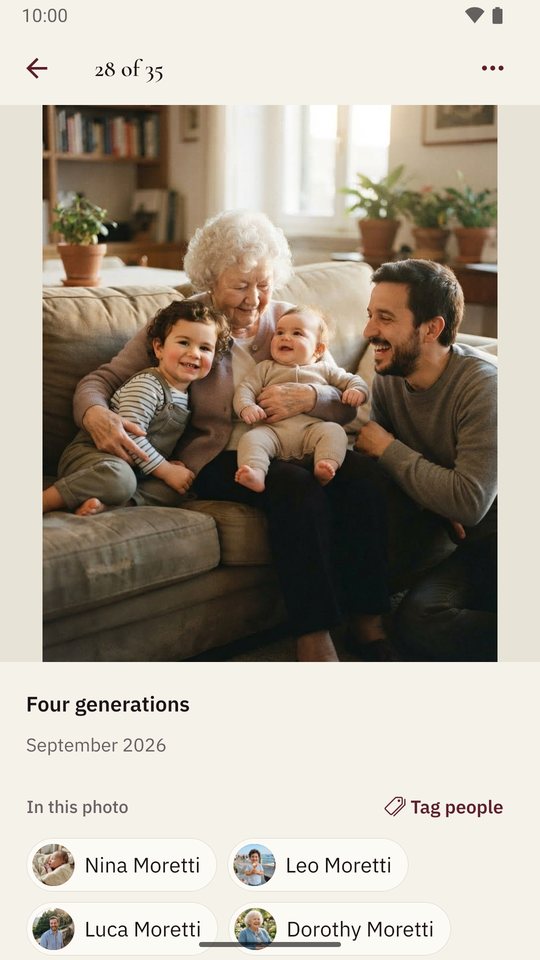
In Shijro, you add a family photo once and tag each person in it, and the photo then appears on each of their pages in the family tree. A wedding photo with twelve people in it is uploaded once, and twelve relatives’ pages show it.
Why photos belong to the family
In most apps a photo belongs to whoever uploaded it, so a group photo ends up uploaded five times by five cousins, or sits on one person’s page where nobody else finds it. I made photos belong to the whole family instead, so each photo exists once and is linked to everyone in it.
The other reason is the shoebox. Most families have a box or an album where only one or two people still know who everyone is. Tagging a photo writes that knowledge down while they can still tell you.
How to tag people in a photo
- Add the photo to the family, with the + on Activity or from someone’s page.
- Tap a face. Shijro finds the faces on your phone. The photo isn’t sent anywhere for this, and Shijro never guesses who anyone is.
- Choose who it is. If they aren’t in the tree yet, choose Add someone new and they’re added and tagged in one step.
In the Hartleys, the sample family, a photo called “Four generations” shows Dorothy Moretti holding her great-granddaughter Nina, with Nina’s brother Leo and their father Luca. All four have that photo on their page.
Finding photos later
The family’s photos are grouped by decade, so you can scroll from the oldest prints to last summer. Each photo can have a caption, a date (a year is enough) and a note.
You can also talk over a photo. The recording stays with it, so whoever opens it later hears who took it and what was happening.
Profile photos, covers and headstones
Any photo of a person can become their profile photo, cropped to their face, or the cover photo at the top of their page. For someone who has died, a photo of their headstone can go with where they rest.
Old documents and manuscripts
Documents work the same way. Certificates, letters, scanned pages of a handwritten family history and other PDFs can be added with a caption, a date and a note, and can belong to one person or to the whole family.
This matters to me personally. A family history written by hand in my family was passed from house to house until the original was lost, and a single photocopy is all that survives. I wrote about it here. In Shijro, a scanned copy belongs to the whole family, and anyone in it can download it.
Questions people ask
Can I add a photo with many people in it?
Yes. Photos belong to the family, so a group photo is added once, everyone in it is tagged, and it appears on each of their pages.
Does Shijro recognise faces?
It finds where the faces are, on your phone, so you can tap one and say who it is. The photo is never sent anywhere for this, and it never guesses who a face belongs to.
Can I keep documents too?
Yes. Birth and marriage certificates, letters and other PDFs can be added to the family or to a person, with a caption, a date and a note.
How much can I keep for free?
Each family has 100 MB of photos, documents and recordings to start with. A family that needs more room can add storage, by the month or the year.